> ## Documentation Index
> Fetch the complete documentation index at: https://docs.anchorcheats.com/llms.txt
> Use this file to discover all available pages before exploring further.
# Reported HWID Spoofer
> Set up Reported HWID Spoofer: Windows preparation, required files, loader download, authorization, cleaning, spoofing and common errors.
This guide is split into easy step-by-step sections for a smooth and successful setup.
Please follow all instructions carefully. Skipping steps may cause the setup to fail.
If you also use a game cheat, rely mostly on ESP and use more obvious features
sparingly. This does not guarantee protection against bans.
## 1. Getting started
### Disable Windows Defender
Antivirus can flag game cheats because they inject code or modify games to
enable features such as aimbot or ESP. This setup includes the Windows
preparation below. An antivirus alert alone does not establish
whether a file is safe; contact support if you are unsure about a download.
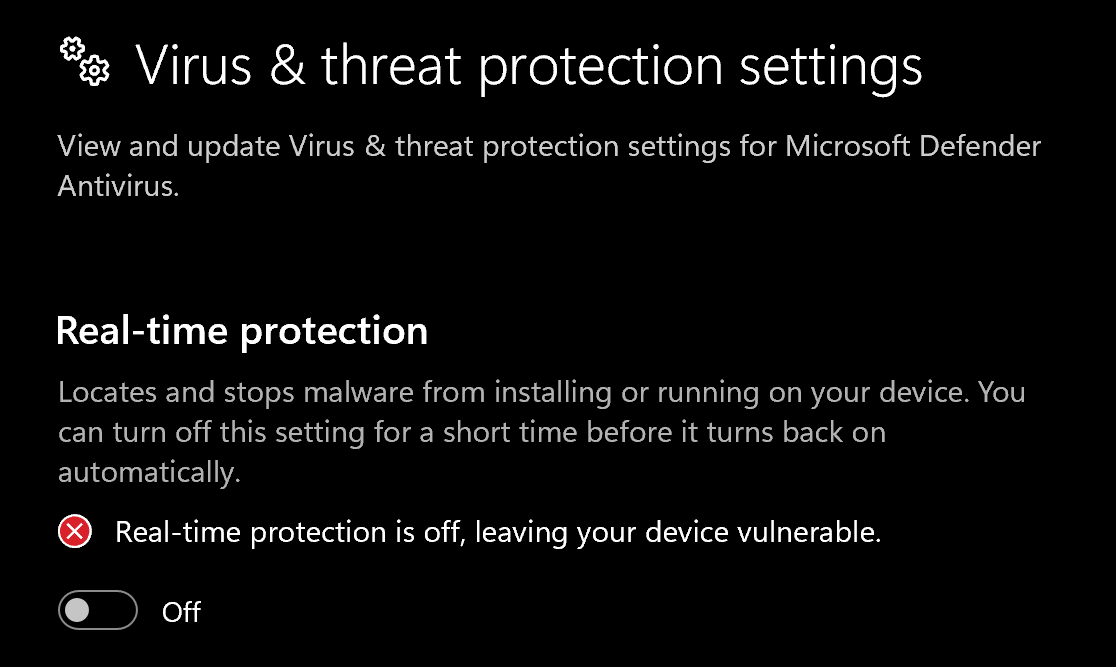
Go to **Virus & threat protection → Manage settings** and turn off all
protection settings shown below.
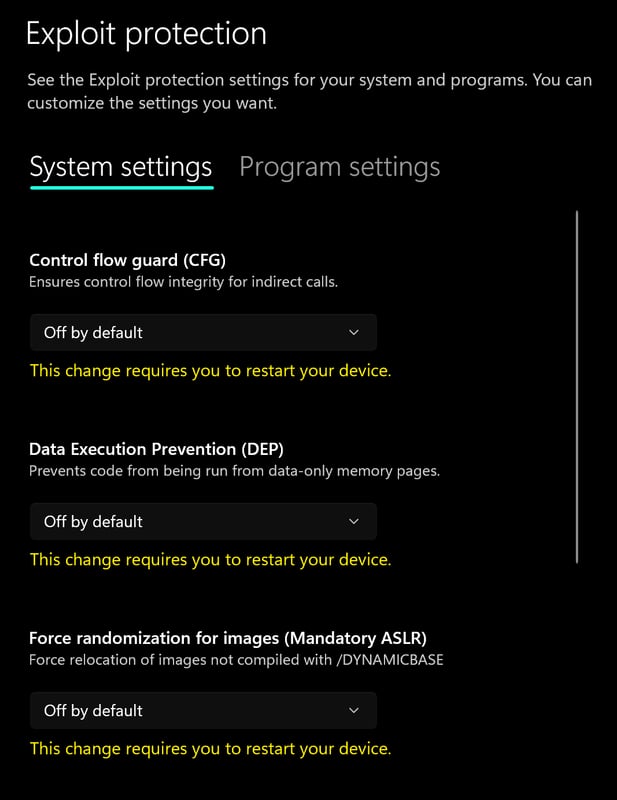
 Go to **App & browser control → Exploit protection settings**.
Select **Off by default** for each option.
Go to **App & browser control → Exploit protection settings**.
Select **Off by default** for each option.
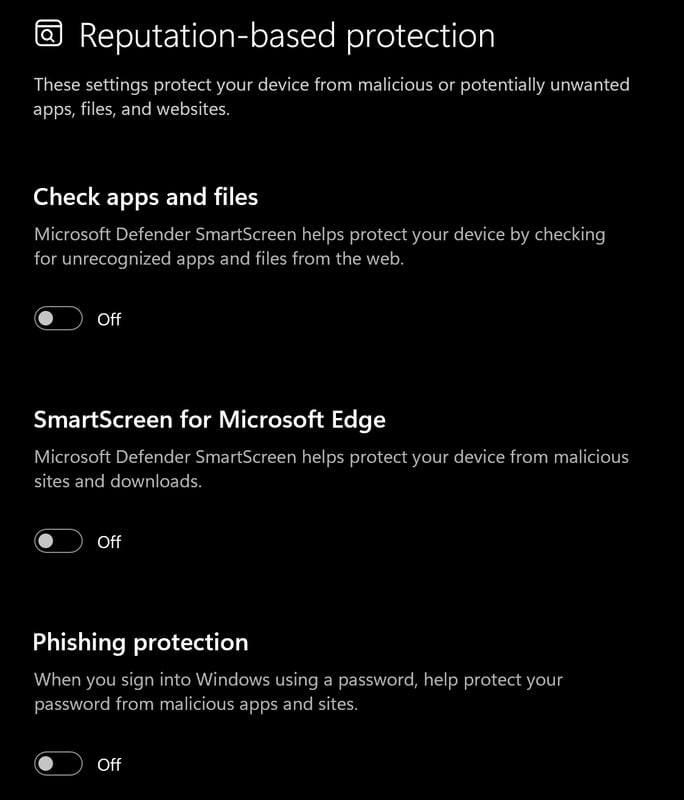
 Go to **App & browser control → Reputation-based protection settings**
and turn off all options.
Go to **App & browser control → Reputation-based protection settings**
and turn off all options.
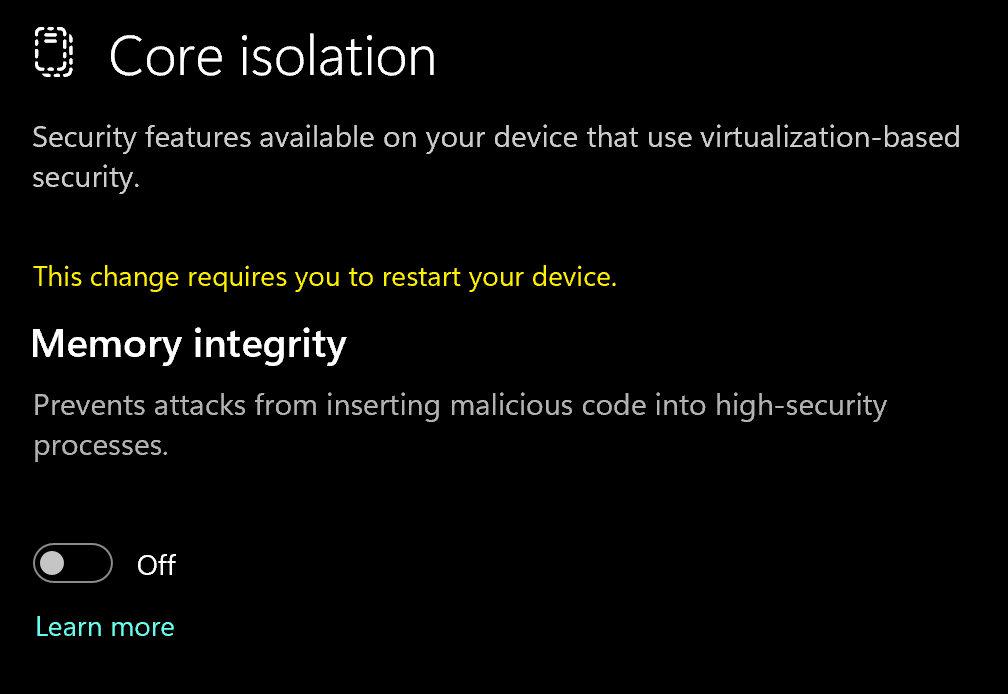
 Go to **Device security → Core isolation** and turn off **Memory integrity**.
 ### Using DControl
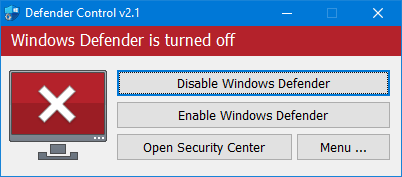
If Windows Defender keeps re-enabling, use **DControl**:
Download [WinRAR](https://www.win-rar.com/download.html?\&L=0) and install it.
It is used to extract the archive.
Download [DControl](https://www.sordum.org/files/downloads.php?st-defender-control).
Extract the `.rar` archive using the password **sordum**.
Open DControl, then press **Disable Windows Defender**.
### Using DControl
If Windows Defender keeps re-enabling, use **DControl**:
Download [WinRAR](https://www.win-rar.com/download.html?\&L=0) and install it.
It is used to extract the archive.
Download [DControl](https://www.sordum.org/files/downloads.php?st-defender-control).
Extract the `.rar` archive using the password **sordum**.
Open DControl, then press **Disable Windows Defender**.
 These preparation steps turn off Windows protections. Keep track of the
settings you change so you can restore them when you no longer use this setup.
### Required files
Install both Microsoft components before continuing:
* [DirectX End-User Runtime](https://www.microsoft.com/en-us/download/details.aspx?id=35)
* [Visual C++ Redistributable (x64)](https://aka.ms/vs/17/release/vc_redist.x64.exe)
## 2. Download the loader
### Spoofer loader download
[Download the Reported spoofer loader](https://reported.lol/gen1_spf.exe).
Enter your license key and click **Authorize**. Then follow the spoofing
steps below.
## 3. Spoofing correctly
### Loading and injecting
Click the small **double-arrow** icon to change your HWID, then click the
**check mark** icon.
Select **Clean** for first-time use or after every ban.
If you get banned frequently and play on many different accounts, check
**Generate New Seed on Clean**.
Press **Spoof** and wait for it to finish.
Once spoofing has finished, launch your game.
## Common errors
Open the [Reported troubleshooting assistant](https://landbot.online/v3/H-2604827-L7Z3ICN6LCQWW0AL/index.html).
1. Press **Software Issues**.
2. Select **Official Reported.lol**.
3. Select the fix that matches your issue.
1. Download [Cloudflare WARP](https://one.one.one.one/).
2. Connect to WARP, then try to launch the loader again.
## Need help?
If you are stuck, unsure about a step or seeing an error,
[open a ticket in our Discord](https://discord.gg/anchorcheats).
Include your product name, the step you reached and the exact error message.
Keep license keys and personal details out of screenshots.
This documentation is built and hosted on [Mintlify](https://mintlify.com), a developer documentation platform.
These preparation steps turn off Windows protections. Keep track of the
settings you change so you can restore them when you no longer use this setup.
### Required files
Install both Microsoft components before continuing:
* [DirectX End-User Runtime](https://www.microsoft.com/en-us/download/details.aspx?id=35)
* [Visual C++ Redistributable (x64)](https://aka.ms/vs/17/release/vc_redist.x64.exe)
## 2. Download the loader
### Spoofer loader download
[Download the Reported spoofer loader](https://reported.lol/gen1_spf.exe).
Enter your license key and click **Authorize**. Then follow the spoofing
steps below.
## 3. Spoofing correctly
### Loading and injecting
Click the small **double-arrow** icon to change your HWID, then click the
**check mark** icon.
Select **Clean** for first-time use or after every ban.
If you get banned frequently and play on many different accounts, check
**Generate New Seed on Clean**.
Press **Spoof** and wait for it to finish.
Once spoofing has finished, launch your game.
## Common errors
Open the [Reported troubleshooting assistant](https://landbot.online/v3/H-2604827-L7Z3ICN6LCQWW0AL/index.html).
1. Press **Software Issues**.
2. Select **Official Reported.lol**.
3. Select the fix that matches your issue.
1. Download [Cloudflare WARP](https://one.one.one.one/).
2. Connect to WARP, then try to launch the loader again.
## Need help?
If you are stuck, unsure about a step or seeing an error,
[open a ticket in our Discord](https://discord.gg/anchorcheats).
Include your product name, the step you reached and the exact error message.
Keep license keys and personal details out of screenshots.
This documentation is built and hosted on [Mintlify](https://mintlify.com), a developer documentation platform.